
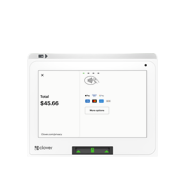
Clover Mini
A sleek, full‑featured POS that fits any counter. The Clover Mini delivers fast checkout, secure payments, and real‑time business management in one compact device.
Key Features
8" color touchscreen for easy order entry and payment confirmation
Built‑in receipt printer for instant customer receipts
Accepts all payments: chip, swipe, tap, Apple Pay®, Google Pay™, PayPal/Venmo®
Front‑facing card slot & contactless reader for faster checkout
Real‑time reporting including sales, refunds, discounts, and top items
Inventory tools with categories, labels, modifiers, and variants
24/7 cloud access to your business data from anywhere
Clover Security with end‑to‑end encryption
Connectivity: Wi‑Fi, Ethernet, LTE
Optional: Cash drawer
Important Activation Notes
Auto‑batch times: Must be adjusted directly through Clover Support Chat or Clover Technical Support after activation.
Batch mode changes (Auto ↔ Manual): Require merchant authorization via Clover Partner Support.
Software plans & apps: Selected and downloaded by the merchant.
Wireless Manager (SIM activation): Completed by the merchant during device activation.
Tips: Must be enabled by the merchant after activation.
Need help? Our office can assist with activation steps.
Clover Software & App Fees
All Clover fees are billed directly to the merchant’s checking account.
Required Fees
TransArmor Security: $9.95/mo (cannot be removed)
Optional Fees
Regulatory Fee: $3.50/mo (removable upon request after approval)
Cash Discount Requirements
Cash Discount App: $9.95/mo
App Market Access: $19.99/mo (required if merchant is on Starter plan)